SOCIAL – How to – Proofread Social Media Posts
Purpose of this How To Guide: Know what to identify as errors when Proofreading or Quality Controlling social media posts
Applicable to: Social Media Executives, Proof-readers, Leads and Account Managers
Customers: All social media Customers
Timescale: One working day after a social media schedule has been sent to you
Introduction
This document lays out the key things to look for when proofing social media posts.
Please log the time it took you to proofread the schedule against the schedule task itself. Make sure you add a note stating that the time has been used for proofreading and classify it as “Proofreading & QC”.
Key Errors to Look for
- Quality of images
- Spelling/grammar
- Network Optimisation
- Article Content (for external sources)
- Whether a post is customer-appropriate
Organic Posts
- Pictures
- Ensure posts have big, appealing images rather than thumbnails that don’t stand out on people’s timelines. You can check whether an image is posting as a thumbnail or not by viewing the post on Hootsuite or Facebook once scheduled.
- Check the image is relevant to the post, for example, if you are talking about a cleaning business, make sure the image shows this clearly.
- Spelling/Grammar
- Network Optimisation
- Twitter – Hashtags on Twitter should come after the URL if they aren’t written as part of the #sentence, like #this. Try to keep a short number of hashtags but make sure they are effective. Tag the type of business, subject of the content, industry it’s relevant too, and location if relevant. Check if a hashtag gains traction using Ritetag or Hashtagify. Also check what comes up for them on Twitter itself, as we don’t want client’s associated with inappropriate posts. URLs might also need to be shortened, you can use an URL shortener of your choice for this.
- Facebook – No hashtags. Can keep the URL legible.
- LinkedIn – No hashtags. Can keep the URL legible.
- Google + – Use plenty of hashtags
- Article Content
- Check content posted is customer-appropriate when linking to an external source and fits their TOV. The author should be reading the articles to ensure there is no swearing/surrounding advertising isn’t inappropriate/it is a trusted source.
- Cross-check information with elsewhere if it doesn’t seem entirely true.
- Extra Details
- Ensure similar posts are spaced out and not back-to-back.
- Make sure there is tailoring between posts between networks and aren’t simply copy and pasted from other networks.
- Ensure titles are aesthetically appealing and correct before posting so people know what to expect when they click. E.g. this one should be changed to the blog title:
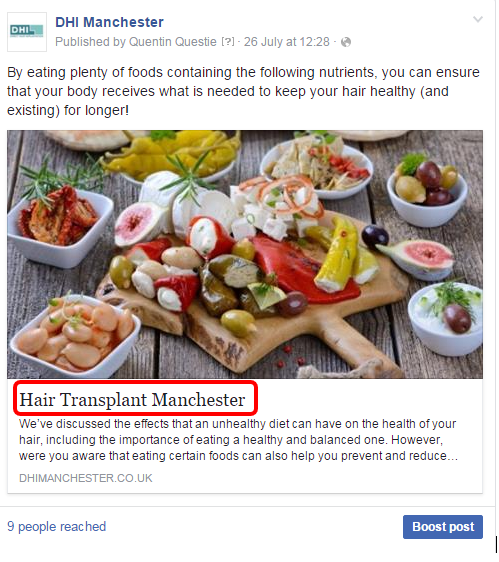
- Ensure images, text, and commentary are all contextual
Adverts
Advert content follows the same principles as above, plus:
- Ensure they aren’t automatic placements – no Instagram or right-hand column unless it makes sense
- Ensure look-a-likes and demographic targeting aren’t being used together
- Make sure the correct advert type is selected
- Check that the adverts are optimised for the right conversion, not impressions unless done intentionally
- Check they have a Lifetime Budget with a start and end date not a Daily Budget
- Use the client’s Business Manager account if they have one as this will ensure they are charged for spend off their card
- Make sure there is less than 20% text on images: http://www.social-contests.com/check-image/
- Check the URLs are linking to the right place and have UTM parameters (see: How to – Create Social Media Adverts)
If unsure whether something has been written or produced intentionally, check with the author.
After Proofreading
If there is a large amount of feedback, save the document on tracked changes if possible and send it back to the author for them to implement the changes.
If there are only minor corrections, correct them and send the schedule back to the author with a note explaining what you have changed.
If there is no specific task for Social Proofreading or Quality Control, log the time against the Social Management task used by the Social or Paid Media Executive themselves and specify that the time has been taken for proofreading and QC. Make sure you classify the time taken as “proofreading & QC” rather than “social”.
After you send the schedule back to the author, your work is done as far as this wave of proofreading is concerned.