SOCIAL – How To – Onboard a Social Media Customer
Purpose of this How To Guide: To ensure the onboarding process is followed consistently for all social media customers
Applicable to: Social Media Executive
Customers: New Social Customers
Timescale: Time may vary depending on what has already been done and what needs implementing (perhaps around 6 hours including rebranding)
Introduction
All new clients joining SQ will go through what we call the ‘onboarding process’, which basically means all the set up, initial research and work that needs to be carried out before an account falls back into a monthly campaign pattern.
The onboarding month can require more work than the client is paying for on a monthly basis. This is usually assessed during the proposal stage, for which executives are consulted.
Once the client has signed their contract, paid their first invoice, and we have received a handover from the account manager, we start the work of setting them up on our software and performing any initial research that needs to be done.
Assessing Existing Social Media Platforms
When a new client onboards, they will have agreed their level of spend for social media and what platforms they wish to be represented on (Facebook, Twitter, Instagram etc.).
We then need to assess if they are already on these platforms and if they require new branding for any of them. For example, they may have a pre-existing Facebook page, but if Twitter is included in their social package we will need to create an account for them on Twitter.
First, we need to ensure that we have all the necessary logins for existing social accounts and that these are added to LastPass. This information should have been given by the client already, but if not, please contact the account manager and ask them to chase the login details with the client.
Creating Social Media Accounts
If we need to set up a social media account, we do this on the relevant platform.
For Facebook, in the Quentin Questie’s account, go to ‘pages’ and ‘Create Page’ – we would then choose the category that applies to them (see below), fill in relevant details and click ‘Get Started’.
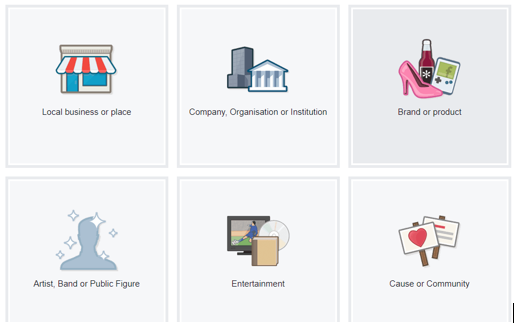
Continue to complete the page profile with all relevant details, profile photo, and cover photo if they have been provided. Then the page is live.
On Twitter, Pinterest, Instagram and LinkedIn we would need to register/create an account. Speak to the client and agree what email address these accounts should be set up under, and what password they require. Ensure these are added to LastPass.
Rebranding (IF applicable)
Some customers will require branding for their social media channels. This may simply be their company logo, but it will need to be adjusted for different networks, as using the same size image for your Instagram and Twitter profile pictures, for example, may render them differently, meaning you don’t have a clear image on every platform.
If an account needs rebranding (this will be agreed in advance as part of the proposal), this needs to be requested from Design & Development. If the project team haven’t created a social media branding task, one needs to be assigned to the D&D team. Assign a task of 1 hour (for 2-3 platforms, 2 hours if more than 3) and attach any imagery we’re looking to use for profile/cover photos. These images must have been sourced or approved by the client.
Once all the branding has been created, upload it to the relevant platforms.
Installing Pixels
We try to track all the work we do for our clients, so once the accounts are set up, make sure we are using a tracking pixel on Facebook and LinkedIn. You will require D&D and PPC’s assistance, so ensure you have spoken to them to action the installation of the pixel.
Researching Customer’s Aims & Tone of Voice
In preparation for posting on their social media, make a call to the client to introduce yourself as the Social Media Executive who will be looking after their account and welcome them to SQ Digital Social Media.
Ask them if they have any goals with social media – some clients may be focussed on driving traffic to their website, others trying to sell products, others creating brand awareness etc. If you are unable to reach them by phone, send them an email or speak to the account manager.
Refer to the Discovery Document, buyer personas and any other literature that has been compiled so that we can familiarise ourself with the customer’s style, as this will need to be reflected in their social media output.
Research the customer’s competitors on social media:
- Are they generating engagement? Are they getting a lot of retweets?
- Look at what styles of posts they are creating on all relevant platforms
- What #tags are they using? Use sites like com to assess which hashtags are popular.
In addition:
- Read about the industry in which the customer operates – is there an upcoming event you need to be aware of?
- Are there any rules and regulations regarding their social media use?
Discuss any ideas you may have with the customer, as what you think may be a great approach for their social media may not be in line with what they want to achieve. Your role is to represent their business on social media, so it’s important you have a clear idea of what they expect. Ahead of planning their campaign, have a clear idea of who you’re talking to on social media, and the way you’re talking to them.
Once all the set up is done, you will be ready to start posting for the customer and can complete any onboarding tasks assigned to you.