SEO – How to – Check the Implementation of an SSL
Purpose of this SQ How To: To ensure the website is fully set up from an SEO p.o.v. for a transfer from http to https, also known as an SSL transfer or installation.
Applicable to: SEO Executives
Customers: All
Timescale: This should take approximately 15 – 30 minutes to complete.
Introduction
Although most of the SSL Transfer is performed by the D&D team, as an SEO you are responsible for making sure that the website’s SEO efforts are not impeded or lost during the SSL installation process.
The following are steps you should take once the D&D department have notified you that the SSL has been installed.
NOTE: THIS NEEDS TO BE DONE WITHIN 24 HOURS OF THE SSL BEING INSTALLED TO AVOID A POTENTIAL NEGATIVE IMPACT ON SEO.
Crawl the Website
Open Screaming Frog and crawl the website.
When completed, look at the HTTP tab to make sure the domain specific URLs all have either of the following HTML status codes:
- 200
- 301
- 307
If you see any of these codes, that means that the SSL installation has been successful, and you can move on to the next step.
If you see any other codes, for example, 302 or 404, notify the developers as soon as possible and do not continue until this code changes to one of the above.
Sitemap Check
Go to the website’s sitemap (usually /sitemap.xml) and press ‘CTRL + F’.
Type into the search box ‘http://’ to determine if all URLs within the sitemap have been changed to accommodate https://.
If successful, the only http:// addresses you should see (if any) will be located at the very top of the page which is nothing to worry about.
Keep this page open as you will need it later.
Set Up New Google Search Console Account
Preferably in the same GSC account where to old website URL resides, click the ‘Add New Property’ button located towards the right-hand side of the page.
Place the new URL into the address bar as you would when you set up a new property.
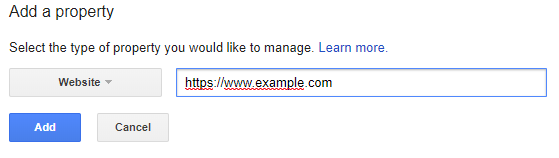 Make sure to add the https:// part of the URL.
You will be asked to verify the new property. The quickest way would be to verify by Google Analytics.
If this doesn’t work, ask your Senior SEO Executive or Lead for assistance.
Submit & Fetch
Now that you have your new GSC property, go back to the sitemap page.
Grab the end of the URL and submit it to GSC which can be located in Crawl -> Sitemaps.
Lastly, Fetch the homepage and all of it’s direct URLs for desktop and mobile.
Notify the D&D and PPC departments that the setup has now been completed.
Complete the assigned task.