SEO – Blog Optimization and Blog Management
Purpose of this How To Guide: To ensure that all the relevant pages are optimised to attract traffic and rank.
Applicable to: SEO Executives, Content Executives
Customers: All
Timescale: The most efficient way to perform this task is while the blog is being uploaded to be published, but in general this should take around 15 to 30 mins, depending of what has been done to the blog already in terms of optimization..
Before You Optimize a Blog Post
As an SEO or Content Writer, your role is to ensure that all relevant pages attract traffic and rank by making clear to users and search engines what can be expected from the content on those pages. This should also persuade them to view/rank your page over the other results on a SERP.
- Is the blog you are trying to optimize a WordPress blog? If so this How to Guide will be particularly useful. If not, you might need the help of the D&D team or the Senior SEO executive to optimize your content.
- Do you have a focus keyword for the content and has it been used while the content was being written?
- Is the meta data (tiles and descriptions) true to the content and not misleading, overselling, unrelated or underselling the value and information it contains?
- Is the content relevant to the company and the reader it has been written for?
- Is the meta data within its character limit?
- Is the meta data unique to that page and not taken/copied from somewhere else?
- Are the title tags and meta descriptions concise, compelling, and informative?
- Does your meta description provide the opportunity for a CTA and if so, does this make sense to the company? Ex: do not include ‘buy online/order today’ if you can only buy in store.
- Does your page have more than one H1?
- Have all opportunities for internal linking been successfully used? This includes anchor text for keywords as well as links to the home page and product pages, contact us page and linking the telephone number.
META DATA – contextualising the page’s purpose
Title Tags
The title tag appears as the blue clickable link in search result listings. As a major ranking factor for search engines and your content’s headline, it is important that it reads well, is within the guideline of 70 characters (excluding spaces), and features all the relevant information, including keywords and search terms you are targeting. At a glance your title tag should tell the reader and search engines that your content matches the user intent and answers the question they were asking.
Do not exceed 70 characters, as this will cut the very end of your headline and look poor visually in terms of user experience. On the other hand, don’t make it too short, as you will be missing out on a lucrative opportunity to offer further information and increase relevance to a wider range of search queries.
Repeating the same word/phrase, capitalising the whole title or using lots of variations of the same keyword could look spammy, both to the search engine and user and, therefore, is unlikely to be thought of as relevant. As a result, your page will be ranked lower and this will reduce click through rate (another major ranking factor).
It is common practice to capitalise the first letter of each word and break up the title visually and logically with the ‘|’ symbol. See example below.
It is also common practice to include the brand name at the end of the title tag if you have said all you to say but still have enough characters left.
An example of a concise and informative title tag that is relevant, within the character limit, and uses the best practices described above can be seen below:

- TIP: There are sites that allow you to see the amount of characters you are using and preview how this will appear in SERPs results, such as: http://www.seomofo.com/snippet-optimizer.html
- TIP: It is worth bearing in mind that using smaller characters like the letter ‘i’ and ‘l’ will allow you a couple more characters as they take up less room than using wider letters such as ‘m’ and ‘w’. The same applies for using the symbol ‘&’ instead of ‘and’.
- TIP: If the version of WordPress you are working on uses the Yoast SEO plugin, you will be able to change this within the plugin itself at the bottom of the blog post admin page.
Meta Descriptions
Similar to title tags, meta descriptions appear on search engine results page (SERP) as a description or strapline to the headline (title tag). They are also important for ranking and limited by character count, albeit their character count is around 170 characters.
- TIP: As with title tags, it is worth bearing in mind that using smaller characters like the letter ‘i’, ‘l’ and the symbol & will allow you a couple more characters as they take up less room.
The description should be relevant, interesting, and concise, whilst telling the user enough about what they can expect to read and find on the page. This brief insight should leave them wanting to click through and read the full article. This is why we recommend using a call to actions (CTA) at the end of a description, if it is relevant and makes sense.
It’s imperative that the meta description be relevant to the content on that page and, therefore, the title tag, so, you should mention the target keyword/phrase/topic to secure consistency and reinforce the message. Make sure that, despite the limited amount of space, it still reads naturally for a good user experience. Overuse of keywords here can also mean your content is considered spammy.
- TIP: Again, http://www.seomofo.com/snippet-optimizer.html will count the characters you are using whilst allowing you to see a preview of how this will appear in the SERPs.
Below is an example of a good meta description:

- TIP: If the version of WordPress you are working on uses the Yoast SEO plugin, you will be able to change this within the plugin itself at the bottom of the blog post admin page.
Alt Attributes
As previously discussed, search engines read sites through HTML as they can not see the site in the way a user would and, therefore, cannot see the images. The HTML applied to these images comes in the form of an alt attribute so that the search engines can read what the image is. Alt attributes may also be referred to as alternative text, alt text and alt tags to name only a few.
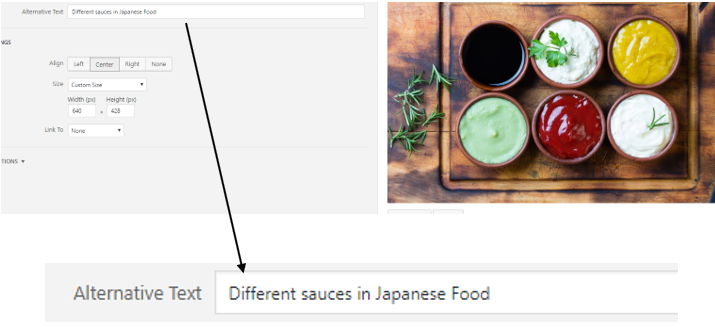
Alt tags must describe what is happening in the image in relation to what the content is discussing. If the keyword fits the description, make sure to mention it, but if not, give an accurate description of the picture priority, as this will make it more user friendly and natural.
As with the title tags and meta descriptions, the alt attributes must be unquestionably relevant to the content within which it sits and, therefore, must also be relevant to the other meta data metrics. For example, if the content is talking about large dogs and the title tag and meta description outline this, it would be confusing to search engines if the images had alt attributes that described small hamsters or yellow flowers. This conflicting message could cause issues with relevancy in regard to returning the page as a result to match a user’s search query about large dogs.
As with other meta data, you must try and keep the alt attribute of each image unique. Alt tags can also be incredibly useful for those with visual impairments for example, as if their computer relays the information on a page through audio, it will also read to them what is occurring in the image.
Whist there is no official character limit for the length of alt attributes, keeping it to between 100-125 characters is recommended by industry experts.
- TIP: Alt attributes can be added to images within a piece of content, as well as in the media gallery in WordPress. The most efficient way to add them is when you are adding a picture to a blog post.
An example of an alt attribute can be seen below:
Focus Keyword
Establishing keywords before writing the content will help target not only the performance of the blog, but also the way it’s written. This should reflect the main or most important theme/aspect of the blog and should be present in the title tag, meta description and first paragraph of the content at the very minimum.
- More than ever, relevancy and the ability to match user intent are incredibly important and this should be kept in mind when finding the focus keyword.
- You can source keywords by checking the company’s keyword plan and investigating questions related to a particular keyword through the likes of SEMRush, using Google Trends to search popular topics and looking at related queries on Google Search itself or platforms such as Answer the Public. Buy doing the research we know that answering and exploring particular subjects at certain times of the year will match user intent because these are already being searched for.
- Whilst it is important to include this in the content and meta data so that a consistent message is kept, if the number of instances is abused and becomes excessive in comparison to the amount of words in the content, users and search engines alike may consider this spam. It is much more important to actually address the information users want when they make a search query using the word/phrase you are targeting.
- As blogs often have unique topics, they will have their own individual focus keyword, but you should be aware that over time, some blogs may have identical target keywords if they are discussing the same topic but taking a different angle or perspective for example.
- As discussed below in further detail, having keywords that read naturally in the h1/h2 is beneficial as these are taken into account as ranking factors and emphasise what the content is about.
- TIP: If the version of WordPress you are working on uses the Yoast SEO plugin, you will be able to change this within the plugin itself at the bottom of the blog post admin page.
Headings – H1/H2
- Think of a h1 as an overriding headline or essay title.
- A page should not have more than one h1 (equivalent to a headline in the HTML code read by search engines) as a strong influencer on indicating what the content topic is and what it discusses, more than one h1 may confuse search engines, which by default will fail to return it as one of its results because it was not sure which one you wanted to be found for/what query you wanted to answer.
- The h2s can then be thought of as subheadings, which describe exactly what you can expect to read in that shorter section, rather than overall.
If it reads naturally, getting the focus keyword or semantically related keywords in such headings is great, but as already discussed, writing for the user and not the search engine is preferable, and you do not want it to look overbearing and similar to spam, or search engines and users may begin to think that it is spam.
- TIP: In WordPress, the title of the blog will automatically become the h1. h2’s can be added within the text as normal, then highlighted, and on the formatting navigation bar dropdown box menu selected to be marked as “Heading 2”.
URL Path/ Slug/ Permalink
As soon as you give your blog post a title on WordPress, an URL path or slug is automatically created. If you don’t give it a title, the URL will automatically divert to numbers. As this is a strong factor on measuring what an URL address is talking about, so make sure this matches your H1
URL paths should always contain a hyphen between each word, EX: what-is-an-url-path
- TIP: In WordPress you can change this under the title box itselt by clicking the “Edit” button next to the permalink. If the WordPress version you are working on uses the Yoast SEO plugin, you might also be able to change this within the plugin itself at the bottom of the blog post admin page.
Structure/Internal Linking
Structure
The structure of a blog and other content creation is important for many reasons, including to enhance user experience, to increase dwell time on the page, to reduce bounce rate, and to become a reputable source.
- Think about whether this flows logically – does it introduce the topic above the fold, discuss it in an orderly fashion, for example chronologically in regard to milestones? Does it have a beginning middle and end (introduction, discussion and conclusion)? Does the content end by bringing it back to how it is relevant to the company and its product/service offering? If fitting, is there a CTA? If so, is this strong enough?
Consider breaking the content with images and subheaders where appropriate. Using this technique will make a long article feel like it won’t take too long to read. And will prevent readers from being greeted by a long wall of text.
Internal Linking & Anchor Text
- It is important to include internal links at every appropriate opportunity to make it easy for the user to find further information, as well as keeping them on your site to find that information rather than starting a fresh search.
- Internal linking can lead to conversion, for example if they are looking at floor tiles and you have wall tiles to match or complement the floor tiles, by internal linkinging you can will take advantage of cross selling opportunities.
- It doesn’t just have to be products and services that are linked, the contact us page is useful if people want to find where you are and how to contact you. ,And linking telephone numbers means that those on smartphones can click on the number whilst reading the content and ring straight through rather than having to find the contact us page.
Don’t link to products/services just so you have an internal link to the page, they should be relevant and offer the user something more, whether it be information or recommendations.
It’s easier and most time effective to optimize a blog post as it’s being written by selecting a keyword, doing the research on what queries are asked on relation to said keyword, and adding the information in the Yoast SEO plugin before publishing it.
The keyword must then appear in the title tag, meta description, first paragraph, content, subheaders and image al tags, if natural and possible.