CONTENT – How To – Plan Next Interval & Planning Pods
This document explains how to plan the next interval’s work for a client.
Applicable to: Content Team (and other Exec’s if Customer does not receive Content)
Customers: Silver
Timescale: 10-15 minutes
Introduction
Plan a client’s monthly Digital Marketing strategy, which will require the presence of Content and SEO and, if applicable, of Social. PPC and the Account Manager will be invited and will attend if they wish to.
In Accelo- The Task
In Accelo, in the current interval (the interval which work is currently being done for) there will be a task assigned. This will usually have 30 minutes assigned to it and is the place the meeting will be attached to.
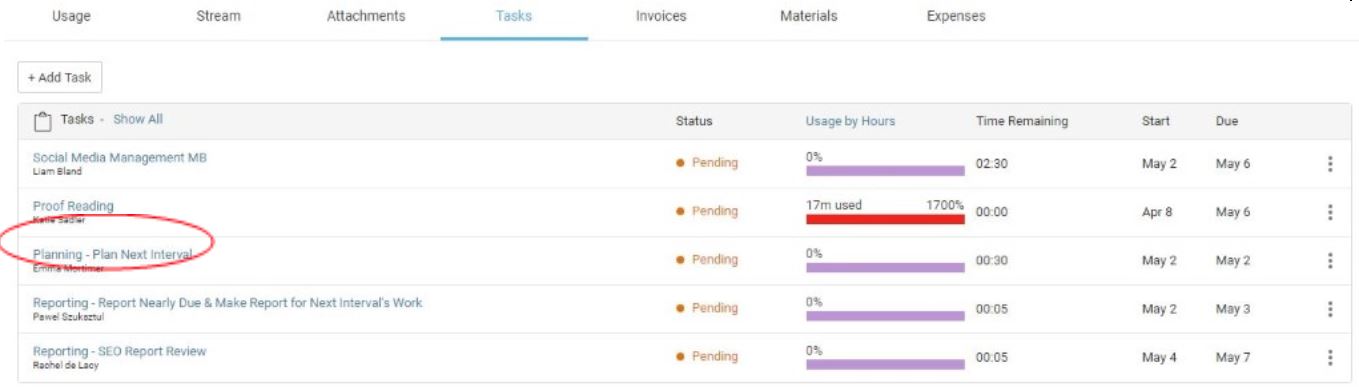
Accelo Meeting to Attend
There should be a meeting scheduled by a project manager in your schedule.
The meeting will usually be held in the DM room at the SEO exec’s desk where a computer is accessible for Accelo and other tools.
In this meeting, there will be all the required team members; a content team member, an SEO team member, PPC (if needed), Social media (if needed) and an account manager (if they have any input).
- Accept invitation to client planning meeting, set up by a Project Manager (this will be in your schedule)
- Get together with the other team members who were invited to the meeting (gather at someone’s desk in the DM room, where you have access to Accelo and other tools)
- Open Accelo in the client’s current interval
- Check ‘SEO/Content Pool’ to see the overall time available
- IN THE MEETING (see below)
In the Meeting
In the meeting, the team will discuss the Customer, do some research into trends, questions, search volumes and discuss how the time could be best spent.
The Team will look at what has worked and at what has not worked (Eg, which blogs, if any, get read).
There will be a Task titled ‘SEO/Content pool’ in the next interval (not the current interval where your Planning task is) which should have the overall time available. If there is no new interval to plan work in, request this from the PM.
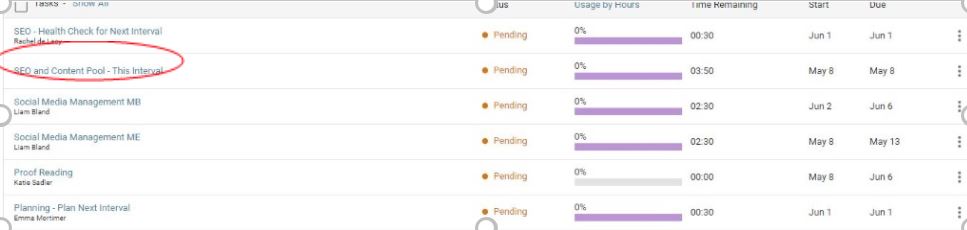
During the meeting, tasks will be created in Accelo in the interval for which you are planning and assigned to the appropriate team members as necessary. The SEO Exec may create the tasks or the Content Exec will write the Tasks on Paper and will create them in Accelo when they return to their own desk. The content member will then assign out the work accordingly to each team member (checking their schedules for workloads and not pushing anybody over 6.5 hrs on any day). You can check schedules here: https://sq.accelo.com/?action=schedule_dashboard
In the meeting:
The account manager will feed back any news/updates from the client in the meeting.
- The Account Manager will feed back any news/updates from the client in the meeting.
- The time will be divided up accordingly to what the client has in their budget.
- The idea bank can be viewed for each client for ideas on blog concepts, as well as the blog series documents. IDEA BANK URL IS FOUND ON COMPANY PAGE AND ON RETAINER PAGE.
- Any unused ideas which were thought of during the meeting and were not used should be stored in the idea bank for future reference.
During the planning meeting, you and the other team members will discuss the client, research current trends, look into possible questions to be answered, check search volumes of keywords and keyphrases and, in general, strategise and spend budget the best possible way.
The team will create tasks in Accelo and assign them to the relevant team members (doesn’t need to be ones attending the meeting). Check out everyone’s schedules in Accelo to make sure that they have time to complete the task assigned to them.
If needed, the account manager will provide updates from the client; if not applicable, the meeting is carried out without this input. Make sure that the Ideas Bank is visited, as it may contain ideas on blog concepts and series. Store any possible ideas that weren’t used in the current interval in the Bank.