SEO – How To – SEO Training Pack
Purpose of this SQ How To: Training material for doing SEO “the SQ way”.
Applicable to: SEO Executives
Customers: All
Timescale: Perhaps 2 hrs to read and several weeks to develop increased understanding through daily work
Welcome
The aim of this training document is to provide you with an introduction to the basics of Search Engine Optimisation (“SEO”). Once you have completed the training, you will be able to start completing SEO tasks and contributing to the team.
If you have already worked with SEO previously, you might find some parts of this easier than others. However, it’s important that you complete all the modules as it will bring you in line with the best practices that are adopted by SQ Digital.
Please do not hesitate to ask any questions as you work through the training pack.
Inside this pack you will find:
- SEO Role Description
- SEO Training Checklist
- The Basics of SEO
- Jargon Buster Dictionary
SEO Role
Championing Award-Winning SEO within SQ Digital
- Learning SEO best practices and demonstrating your knowledge through the implementation of quality optimisation across our clients’ websites
- Representing the SEO department in client meetings
- Taking ownership of your own portfolio of SEO clients
- Learning technical aspects of SEO in order to implement optimisation across a number of CMS systems, including WordPress, Magento, SQ Shop and Crafts
- Understanding the keyword research process and ability to create a comprehensive keyword plan detailing the optimisation of a client website
- Tracking organic traffic through use of Google Analytics
- Keeping up-to-date with changes within the SEO industry including algorithm updates
- Educating colleagues and clients on the principles of SEO as well as on any relevant SEO news and updates
Writing High-Quality SEO Content
- Learning and understanding the principles and requirements of optimised content for web consumption
- Writing high quality SEO content in a timely manner
- Tracking the SEO progress that your content has made and identifying areas for further improvement
Planning Superior SEO Campaigns that Deliver Positive Results
- Understanding the planning process in terms of the Digital Marketing team structure and in terms of implementing campaign tasks through the CRM
- Conducting health checks for a number of clients to identify SEO tasks that need to be carried out
- Taking ownership of a number of clients and planning the SEO element of their campaigns on a monthly basis as well as assisting other teams if needed
SEO Training Check List
| Training | Date Completed | Initials of Trainer |
| Google Webmaster Guidelines | ||
| Moz Beginners Guide to SEO | ||
| Task 1 – Keywords | ||
| Task 2 – Keyword Research | ||
| Task 3 – Keyword Plan | ||
| Task 4 – SEO Content | ||
| Task 5 – Health Check | ||
| Task 6 – Campaign Planning | ||
| SEMrush Certification | ||
| Google Analytics for Beginners | ||
| Advanced Google Analytics | ||
| Google Analytics for Power Users | ||
| Screaming Frog Tutorials | ||
| How to – Google My Business | ||
| How to – Backlink Audit & Disavows | ||
| How to – 301 Redirects | ||
| How to – Blog Optimisation | ||
| How to – Competitor Analysis | ||
| How to – Schema Mark-up | ||
| How to – Page Optimisation | ||
| How to – SEO Transfer | ||
| How to – Quality Control (Platinum & Silver) | ||
| How to – Campaign Planning Meeting (Platinum & Silver) |
The Basics of SEO
1. Introduction to SEO
Several factors are considered when implementing a successful SEO campaign. It’s essential that you have a good understanding of what and why these factors are important and how to use them to optimise a website.
Please watch the following videos:
- How Search Engines Work (5:12 mins):
https://www.youtube.com/watch?v=LVV_93mBfSU
- How SEO Works (3:16 mins):
https://www.youtube.com/watch?v=Apa6_o3Vc7c
Please also read the following guides:
- The Moz Beginner’s Guide to SEO:
https://moz.com/beginners-guide-to-seo
- Google’s Webmaster Guidelines: (video 2 mins + reading) https://support.google.com/webmasters/answer/35769?hl=en
SEO is continuously evolving and it’s useful to understand how it has changed over the years. Read the following article:
- The Evolution of SEO Trends Over 25 Years https://searchengineland.com/evolution-seo-trends-25-years-223424
2. Different SEO Techniques
2.1 Black & White Hat SEO
In the past, SEO used to be primarily about pleasing search engine bots by keyword stuffing and paying for thousands of unreliable links. Today, SEO is concerned with putting the user first. Many of the old, ‘black hat’ SEO techniques no longer work in the long-run and are likely to incur you a penalty from Google. At SQ Digital, we focus on using only “white hat” principles to ensure that the client reaps the rewards of a positive, efficient and organic campaign.
Google’s Webmaster Guidelines explains that we must first think of the user, rather than search engines, when optimising the website. However, there are several things you will need to do to ensure a website is in good condition.
The methods that should be used when optimising a website, as outlined by Google, are as follows:
- Make pages primarily for users, not for search engines
- Do not deceive your users
- Avoid tricks intended to improve search engine rankings. A useful test is to ask, “Does this help my users? Would I do this if search engines didn’t exist?”
- Think about what makes your website unique, valuable, or engaging. Make your website stand out from others in your field

2.2 Onsite vs. Offsite
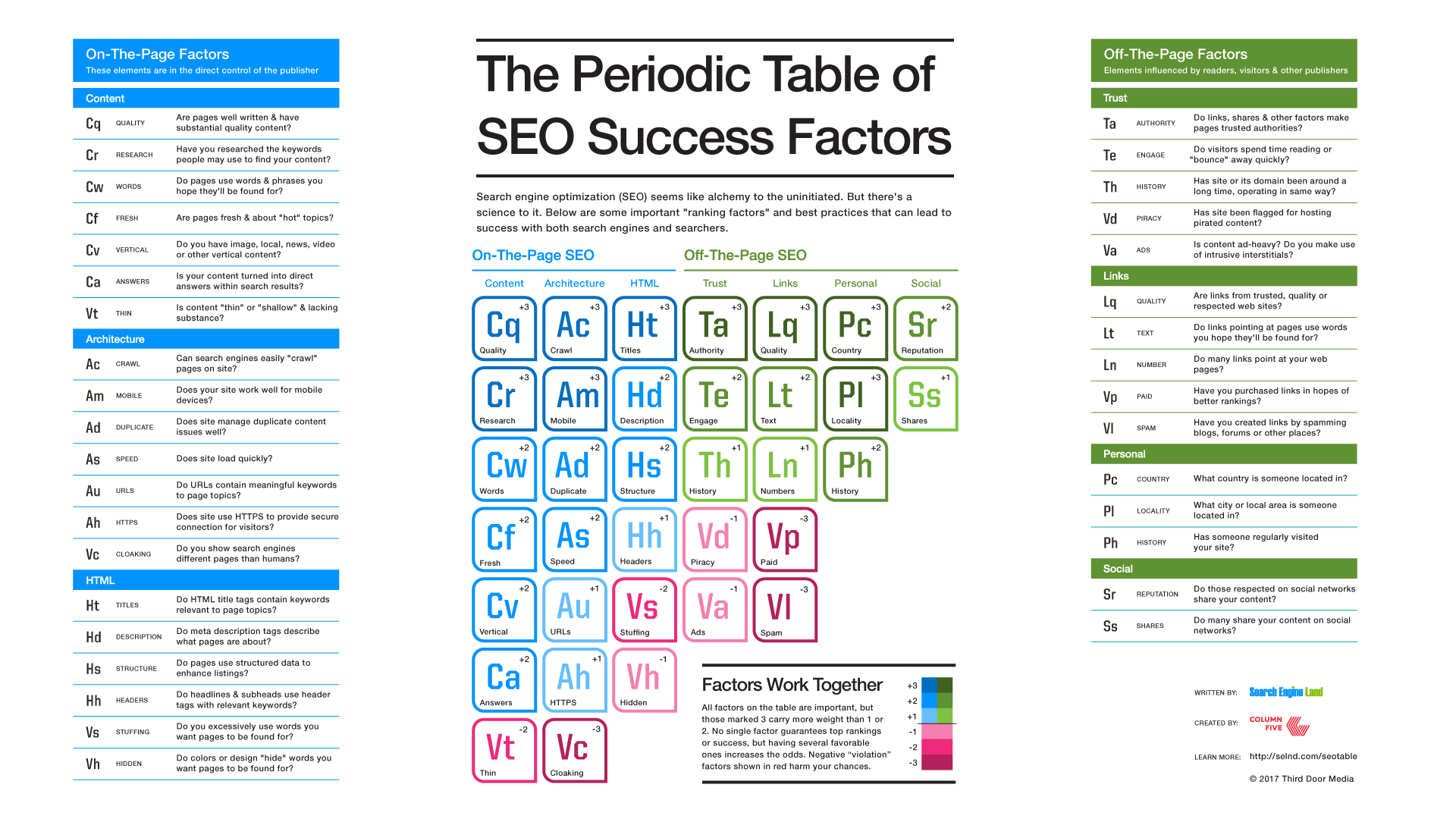
An SEO campaign is typically divided into two categories: onsite and offsite.
Onsite SEO is the name given to work conducted on the website itself, such as the optimisation of meta data. By getting this right, you can ensure that the site you are working on is in the right condition to begin ranking well.
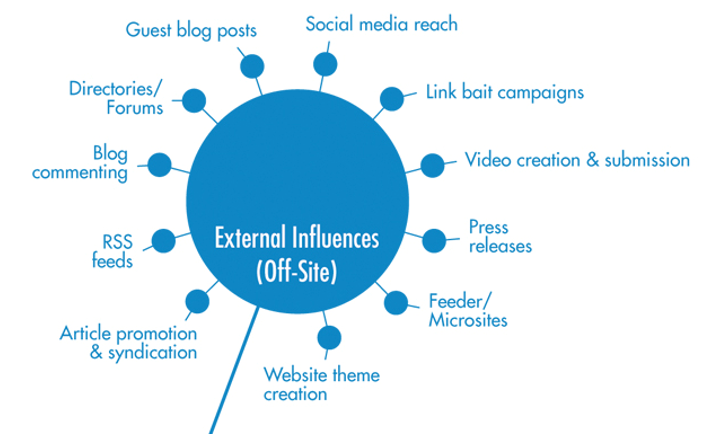
Offsite SEO is the name given to work conducted on other sites and platforms. It is more complex and can include techniques such as link building, social media posting and submitting your site to directories.
Think of it this way:
If you want to sell your house and get the best value, you first need to make sure that it is in good condition. This might mean refurbishing the house, asking a surveyor to check the foundations or furnishing it in a way that will appeal to buyers. This is the same as onsite SEO.
However, making the house appealing alone won’t make sure that buyers see your house or that you make a sale. You may have to hire an estate agent to bring buyers around, or you can post about it on social media and even ask your friends to say how good it is. This is like offsite SEO.
2.2.1 Onsite Factors
To determine what your webpage consists of quickly, Search Engines look at specific places for the information/markers (keywords) it needs. It is essential a keyword(s) appears in all these places.
At the very least, the keyword should appear in the:
- URL – the keyword should be included in the URL path of the page, for example, SQ Digital’s SEO page has the following URL – https://www.sqdigital.co.uk/seo-agency/
- Title Tag – appears as the blue clickable link on search results, your keyword should appear at the front of your title tag.
- Meta Description – a short description of what your page is about, usually ending with a call-to-action (CTA).
- H1 – also known as the page title, this is the header you see as soon as you open the page
- H2 – also known as the page sub-headers. As you develop your content, you should break it into readable chunks by subject and these should be headed by a sub-header. This is especially important on mobile as it allows people to jump straight into the subjects they want to read about. For instance, if you are writing about “dog grooming”, one of your sub-headers could be “best brushes for dog grooming”
- Content – the first paragraph of your content should also contain your keyword. As early as possible in the paragraph would be best, but this also needs to sound natural, so make sure you mention it as naturally as possible.
Have a look below at what the perfectly optimised page should look like. This page includes the basic optimisation discussed above and more.
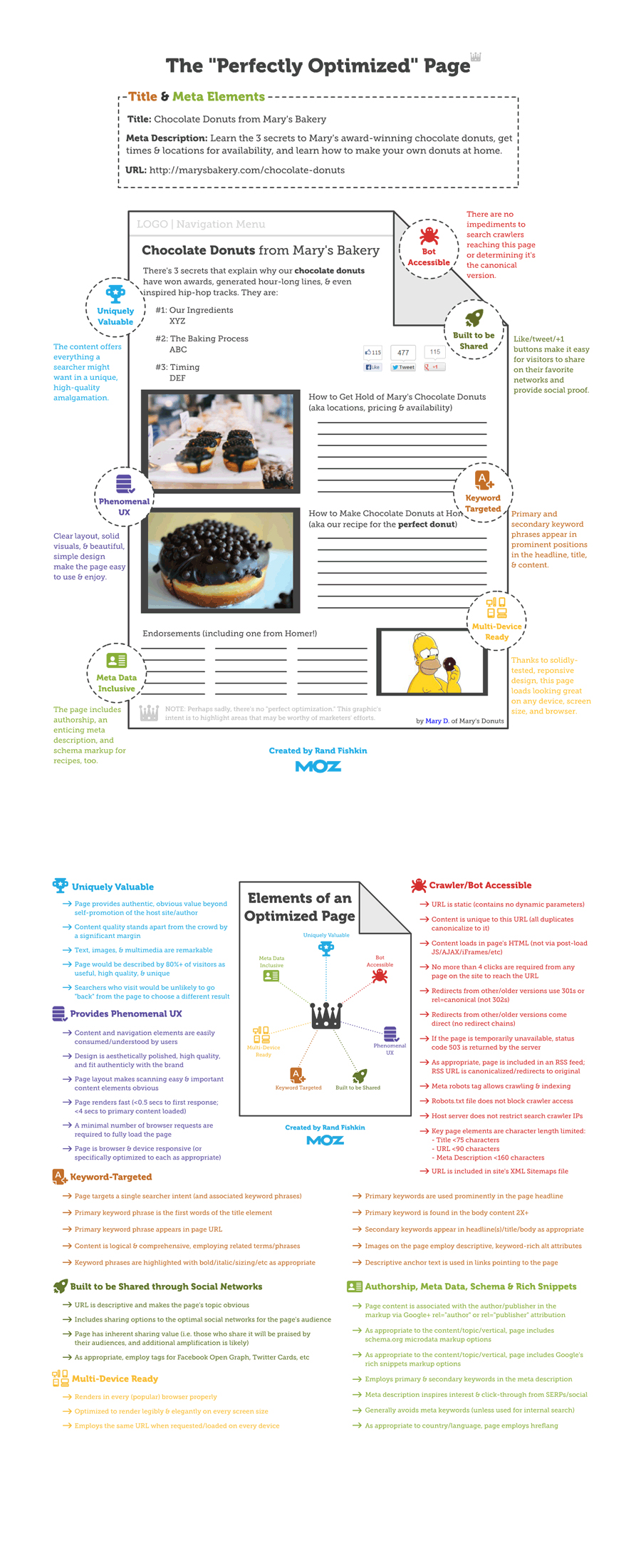
Read about the other aspects of onsite SEO here.
2.2.2 Off-site Factors
2.2.3 Onsite vs. Offsite
3. Keywords
Getting your keywords right is one of the most important elements of any SEO campaign. As search trends and client products change, keywords should be reviewed and updated regularly to ensure the client’s website remains competitive and relevant.
The placement of keywords on a page is very important – they should be featured in your title tag, meta description, header tags and your content.
The keywords you are using need to make contextual sense with the website and page you are optimising – you are not going to optimise www.cats.com/very-cute-kittens for ‘dogs’.
By optimising for a given keyword, you will also need to optimise for other relevant phrases around this – e.g. if you are optimising for ‘cute kittens Lancaster’, you may also use ‘adorable kittens’, ‘kittens near Lancaster’ or ‘fluffy kittens in Lancaster’
Overusing the same keyword can be detrimental to a site’s SEO performance – if you read it out loud and it feels like it is written too many times, chances are it’s written too many times
For a quick recap of why keywords are important, re-watch this video to understand a bit more about how search engines work, and how keywords play an important part in using them: https://www.youtube.com/watch?v=LVV_93mBfSU (5:12 mins long).
Further Reading
- Everything You Need to Know About Keywords: https://trellis.co/blog/everything-you-need-to-know-about-keywords/
- On Page SEO Checklist: https://backlinko.com/wp-content/uploads/2016/06/On_Page_SEO_Checklist_Backlinko.pdf
Complete Task 1: On-Page Optimisation
3.1 Conducting Keyword Research
Keyword research is a core SEO task that involves researching and identifying commonly used words and phrases that people are likely to type into a search engine.
The purpose of this task is to understand what we should be trying to rank for as part of an SEO campaign to attract high quantities of relevant traffic to a client’s website.
Researching these keywords helps to give us an idea of how competitive a keyword is going to be within organic search, and whether this is in line with the client’s budget and expectations. The higher the competitiveness for a keyword, the longer it will take for it to rank in a high organic position. It also means that the SEO campaign will require a significant amount of time each month.
Keyword research is also about exploring the various ways that people can search for the same thing.
For example, when searching for a company like SQ Digital, a user might search for any of the following:
- Digital marketing agency
- Digital marketing agency Lancaster
- SEO agency
- SEO agency Lancaster
- Digital Agencies SEO
All keyword research starts with a product, topic or idea – sometimes referred to as the “money phrase”.
This phrase often comes from a client’s industry sector or niche, their core service or product. If this is not provided to you from the beginning of the campaign, it will be up to you to find it.
You will need conduct some client or industry research; speaking to the client and look at what their competitors are targeting. This keyword or phrase is just the beginning.
Click here to read a step-by-step process for conducting your keyword research:
https://backlinko.com/keyword-research
Please also watch the following video:
- A Step-by-Step Process for Discovering and Prioritizing the Best Keywords (12:07 mins): https://www.youtube.com/watch?v=b_swS0ET4VU
To identify search volumes for keywords, we use the Google AdWords Keyword Planner tool. The account we use to research keywords will be saved to your LastPass account under “[email protected]”.
Please watch the video below to learn more about how to use the tool:
- Google Keyword Planner 2018 (8:45 mins, please skip the first 4:59 mins of the video): https://www.youtube.com/watch?v=kuhc5G7hEGA
Complete Task 2: Keyword Research
3.2 Creating a Keyword Plan
Each of our clients receive a keyword plan in their onboarding month – this includes the keywords identified as part of the keyword research, as well as our suggestions for the following page elements:
- Target Page and its URL (column F & G of the Excel document)
- Optimised URL (Column H)
- Title Tag (column I)
- H1 Tag (column J)
- Meta Description (column K)
This data will typically show like this on a search result:
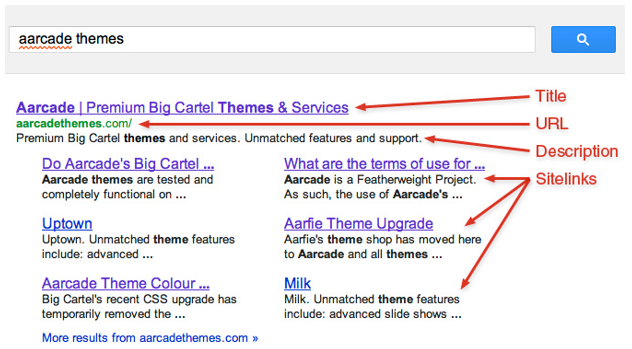
3.2.1 Target Page & URL
Once the keyword research has been completed, the next step is the allocation of the chosen keywords to the relevant pages on the client’s website (or whether these need to be created).
When deciding this, it is good practice to approach this as a potential user of the website having searched for this keyword. Is this the page you would expect to land on having searched for that keyword? Are you likely to buy the product or contact the company if you landed on this page? If the answer is yes, this should be the correct page.
We would suggest allocating a maximum of 2-3 keywords (1 primary keyword and 2 secondary) to each page that you include in your keyword plan. This is because the optimisation fields can only fit so many characters, and the more keywords you add in, the more you dilute the optimisation.
You do not need to allocate a keyword to every single page on the website – if the page doesn’t seem relevant for a keyword, this can be ‘visually optimised’ (where the optimisation fields will be formatted to match the optimised pages aesthetically).
If you have a keyword that doesn’t fit into any of the existing pages on the site, it is worth asking the client if this keyword is of interest to them. It may be worthwhile adding a new page to the website to target this keyword.
3.2.2 Optimised URL
On most of the CMS systems we use, majority of URLs across the website can be changed (except for the home page as this is the ‘root domain’).
The purpose of changing a URL is to improve the optimisation of the page by making the URL more relevant to what the page is about, as well as the keywords we are trying to target.
To optimise your URLs in your keyword plan correctly, follow these simple tips:
- URLs must be readable to everyone – Google is very clear in the Webmaster Guidelines that we must prioritise user experience when optimising our sites, so make sure your URLs use readable language that gives a brief idea of what the page is about (e.g. /black-jackets/ is good, but /products_?uwuwbfowm=?h/ is not)
- Keep your URLs tidy – Categories and sub-categories can make URLs look untidy and overly long, as well as potentially meaning the URL loses some authority (e.g. /your-keyword/ is often considered better than /category_page/your-keyword)
- Use hyphens, not underscores – Spaces cannot be used to separate words in a URL, so it is best practice to use hyphens (rather than underscores) to separate the words in a URL (e.g. http://www.sqdigital.co.uk/seo-agency/)
- Include target keywords – On every page you are optimising, you should include your target keyword in the URL (e.g. yoursite.com/your-target-keyword)
Remember, if you are making changes to an existing URL, you MUST 301 redirect it to maintain a good user experience. You will learn more about this later in the guide.
3.2.3 Title Tag
Title tags – sometimes referred to as page titles – are the title for the page.
A title tag is an HTML element that specifies the title of a web page. Title tags are displayed on search engine results pages (SERPs) as the clickable headline for a given result, and are important for usability, SEO, and social sharing. The title tag of a web page is meant to be an accurate and concise description of a page’s content.
Google typically displays the first 50–60 characters of a title tag. If you keep your titles under 60 characters, you can expect the majority to display properly.
When writing title tags, you should consider the following tips:
- Length – Keep the title tag within 50-60 characters in length (use tools like http://www.seomofo.com/snippet-optimizer.html to check the length of your title tag)
- Keyword inclusion – When writing your title tag, you should include your most important and relevant keyword first, followed by any other additional information.
- Separations – It is important to differentiate different words and phrases with a separation, our most favoured one being the ‘pipe’ ( | )
- Avoid duplications – Absolutely no two pages on the website should have identical title tags. Each one should be completely unique and relevant to the page that it’s on
3.2.4 H1 or Header Tag
A header tag is applied to headings and sub-headings on a page to make this readable to search engines, as well as applying certain styles to the text visually.
The most important tag is the <H1> header tag, which is typically the title of the page or blog post. Header tags have a top-down hierarchy from <h1> to <h6>.
As a <h1> tag is the most important on a page, this is the one we will include when structuring a keyword plan. We would typically recommend only including one optimised <h1> tag per page.
Your <h1> tag should include the target keyword, as it is a key ranking factor.
Here are a few best practice tips for H1 tags that you should be aware of:
- Describe the content the user will find on the page – This will benefit the user as they will know what they can expect from your content before they read on. Your H1 may be similar to your title tag because of this.
- Typically, between 20-70 characters in length – The length of a H1 isn’t as important as that of the title tag and meta description, however you want to make sure you are getting the most out of the tag for optimisation purposes. It’s also important to keep them short as they have a visual effect on the font and appear larger than other content on the page.
- Placed towards the top of your content – As a H1 serves as the title of your page, it should be placed at the beginning of your page. Sub-headings throughout the content should therefore be marked with a H2 tag.
3.2.5 Meta Description
Meta descriptions are HTML attributes that provide concise summaries of webpages. They commonly appear underneath the blue clickable links in a search engine results page (SERP).

They work to describe what can be found on a page for both users and search engines, and as they are shown in search results, can be used to encourage users to click on a page.
It is very important that you ensure your meta descriptions are well written, paying attention to spelling and grammar.
When writing your meta description, it is important that you follow these best practices:
- Length – You should keep your meta description to between 150-160 characters in length. Meta descriptions tend to be cut off if they are longer than 160 characters, so you do not want them to be any longer than this (use tools like http://www.seomofo.com/snippet-optimizer.html to check the length of your meta description).
- Keyword Placement – Although Google advise that meta descriptions do not factor into their ranking algorithms, keywords used in a Google search are highlighted in a meta description when displayed in SERPs, encouraging users to click on the result. Therefore, it is advised that you include the target keyword within the description – preferably towards the beginning.
- Avoid duplications – Each meta description on a website should be unique and describe the content on that specific page.
- Add a call-to-action but avoid being pushy – the aim of meta descriptions is to help a reader decide if the page is what they are looking for or not. You want to use the keywords, while giving the reader the relevant information and encouraging them to click, without coming across as pushy.
3.2.6 Visual Optimisation
A keyword or optimisation plan is not restricted to the pages on a website that will be targeting keywords; it is also important to include the additional pages that you will ‘visually optimise’.
This essentially means ensuring that the SEO and HTML elements described above are written in the same format as your optimised pages. This section typically includes common pages such as About Us and Contact Us.
4. Using WordPress & Other CMS Platforms
Over the course of working in SEO, you will encounter several different types of Content Management Systems (CMS). The most common is WordPress and Magento, and the below online guides will help you gain a better understanding of how you can use these systems.
4.1 WordPress
A Complete Guide to WordPress Content Management: https://managewp.com/wordpress-content-management-complete-guide
Using the Yoast SEO Plugin: https://yoast.com/wordpress-seo/
Using the All In One SEO Plugin: http://www.wpbeginner.com/plugins/users-guide-for-all-in-one-seo-pack/
4.2 Magento
Magento CMS Tools: http://docs.magento.com/m1/ce/user_guide/cms/magento-cms.html
Managing Pages: https://www.youtube.com/watch?v=Ahz1jjhtmVs
Adding Products and Categories: https://www.youtube.com/watch?v=iA6x4zpfzDw
4.3 Crafts
We also work in other CMS platforms such as Crafts, but this platform is a little tricky to work on and could require D&D assistance. So, if you encounter a website that uses Crafts, please ask your trainer or the Senior SEO Executive to show you how to work within this CMS platform.
Complete Task 3: Keyword Plan
5. Writing SEO Content
Content makes up a big part of the online user experience, and this makes it a very important SEO factor.
Once you have covered the technical aspects of onsite SEO, it’s time to make sure that your content is on par as well.
5.1 Keyword Usage
The main purpose of writing SEO content is to make a page more relevant for target key phrases and using keywords throughout the content is an effective way to achieve this.
Several years ago, web content written for SEO purposes was low in quality and used keywords in large quantities in a very unnatural way. This process is referred to as ‘keyword stuffing’, an example of which can be seen below:
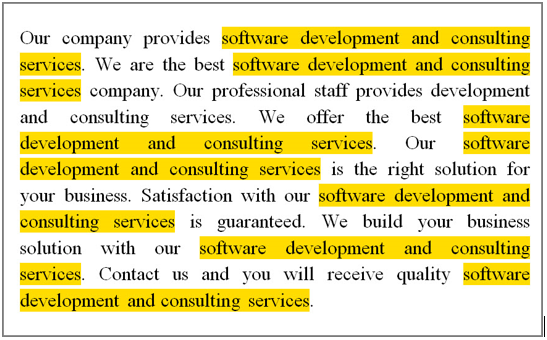
Read more about keyword stuffing in Google’s article about irrelevant keywords. It is important to remember that keyword stuffing can lead to a site incurring a manual or algorithmic penalty from Google. We recommend using target keywords as naturally as possible throughout the content. Typically, this would include an instance of the target keyword in the first line of the content, as this is an indication of relevance to search engines.
As well as mentioning the target keyphrases throughout the content, you should also consider semantic alternatives that a user may search for, as this allows the content to be seen as highly relevant. For example, in the above example the writer could have used ‘software consultancy’ as an alternative.
5.2 Informative and Valuable
To write SEO content successfully, you should put yourself in the mindset of the target audience and consider what they would want from the content.
SEO content has moved on from being a sales pitch loaded with keywords; it needs to provide the user with information that is valuable and relevant to what they are searching for.
High quality SEO content in general tends be at least 350 words long, must be written well with correct spelling and grammar, provide information about the product/company, and offer the user anything else they might find interesting. This may include reviews, awards or accreditations the company have been awarded with.
Information that is considered valuable can be any of the following depending on the page and company:
- Awards and accreditations
- Client testimonials
- Delivery information
- Information about the product (e.g. material, flavour, style etc.)
By including this sort of information and ensuring the site content is written to a high standard, Google and other search engines will view the pages as relevant to users and you will therefore see the benefits of this in organic keyword positions.
5.3 Use of Headings and Sub-headings
In the previous section, you will have gained a good understanding of how header tags (<h1> to <h6>) play a key part in making a ‘perfectly optimised page’, and it’s important that you remember this when writing a page of optimised content.
The title of your page should be written in a H1 format, according to the guidelines given in the previous chapter. If this page is included in the keyword plan, it may have already been allocated a H1, however if this is a new page you will need to create one.
Sub-headings are also a great way to break up content and improve the readability of a page. These sub-headings will typically be formatted with a H2 tag (<h2>) and can also be an opportunity to use variations of the target keyword if relevant.
Watch this video by Moz to learn more about writing for SEO and how it has evolved over the years (11:25 mins): https://www.youtube.com/watch?v=ZLrKFRYGM5M
Other Helpful Links:
Search Engine Land – “Content & Search Engine Success Factors” http://searchengineland.com/guide/seo/content-search-engine-ranking
Yoast – “SEO Copywriting: The Ultimate Guide” https://yoast.com/complete-guide-seo-copywriting/
Complete Task 4: SEO Content
6. SEO Health Checks
SEO Health Checks allow us to assess the performance of a website, as well as identifying if there is anything within the website that could be causing the site to not be performing as expected.
Health checks are completed each month to identify any potential issues and informs our monthly SEO campaign.
You can read a quick overview of what a Health Check should include in our How to SEO Health Check & Camping Planning Meeting Prep.
6.1 SEMrush
SEMrush is the tool we use to extract information on how to improve websites and what problems need fixing. It’s important you are confident using this tool.
The login details for SEMrush will already be saved in your LastPass.
To get familiar with the tool, please take the SEMrush SEO Toolkit Course here. These include 14 short videos and should take about 4 hours to complete.
6.1.1 SEMrush Checks
From the homepage, click ‘Projects’ on the left navigation bar and select the client you wish to check, or alternatively search for them using the search box that appears under ‘Projects’.
Once the client dashboard opens, click ‘Site Audit’.
Take note of the ‘total health score’ for the site.
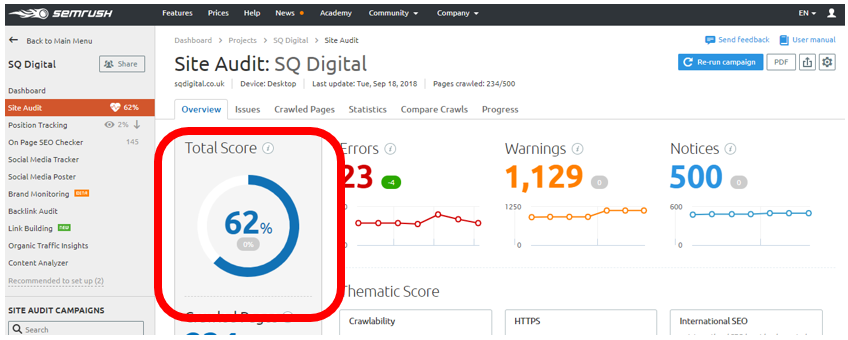
Underneath the ‘Total Score’, check for pages that appear broken or have issues. If they are a 404 error, they will need redirecting – we will talk about this later on this training pack.
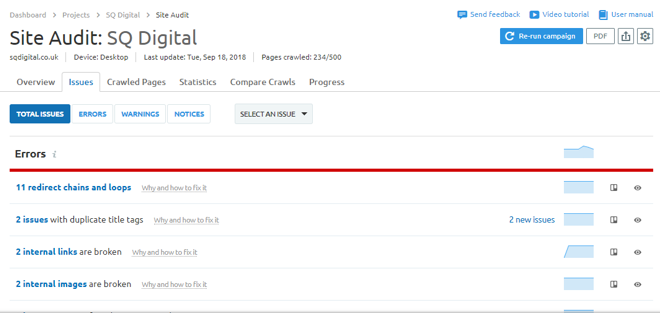
Check the ‘Issues’ tab and note down any critical issues that need action. Things like broken pages (404s), duplicate content, sitemap issues, slow page speed or a site not having an SSL (https) are considered critical issues. Followed by internal links, redirect loops, and other smaller discrepancies.
Make sure to click through and check the errors, as SEMrush has the tendency to point out everything and sometimes what it picks up is not always relevant or is connected to the design of the site for which we have no access, for example. In these instances, we can only advise the clients about the problems, but we can’t fix them.
6.2 Google Search Console (GSC)
Google Search Console (GSC) is an online dashboard that helps you monitor and maintain a website’s presence in Google search results. This allows us to quickly and easily gauge the health of a website as well as being able to communicate certain changes to Google.
Although GSC is not essential to a site being indexed by Google, it is an extremely beneficial tool when running a monthly SEO campaign. All the websites we provide digital marketing services to are verified with GSC (except in certain circumstances, such as where we are only managing a sub-domain).
Each client is logged into a particular GSC account. You can check which account they are registered to by checking the ‘Tags’ on their ‘Company Profile’ in Accelo. You will already have access to all accounts via your LastPass.
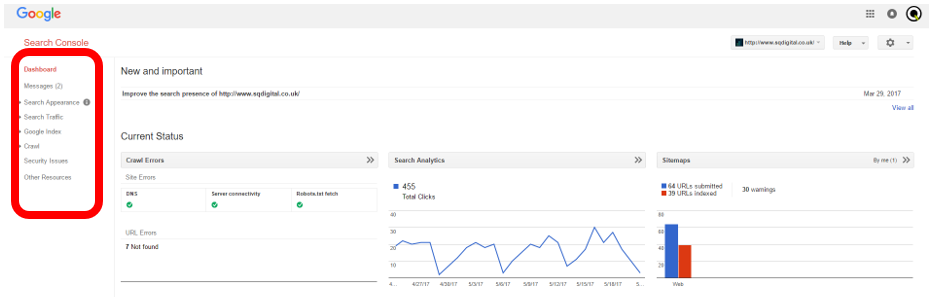
When you open GSC and select the site you are working on, you will see a screen like the one above. This is the Search Console Dashboard, which gives a general overview of the data contained within GSC for the site. This includes New and Important Messages, Crawl Errors, Search Analytics and Sitemaps.
We strongly advise that you check all tabs of the Google Search Console when performing an SEO health check, however the following tabs are essential:
- Messages
- Search Appearance à HTML Improvements
- Search Appearances à Structured Data and Data Highlighter
- Search Traffic à Manual Actions
- Google Index à Index Status
- Crawl à Crawl Errors
- Crawl à Sitemaps and robots.txt
- Security Issues
If you uncover several URL errors or sitemap warnings, you should plan to fix these as part of the client’s monthly campaign. Also, if there are any major health issues, such as a manual action or a security issue, this should be passed onto a Senior SEO Executive.
Please note that GSC is in the process of redesigning its console. As the NEW Search Console is harder to navigate, we have chosen to stick to the old version, but when this gets discontinued, we might have to work in the new version.
To find out more about the NEW Google Search Console watch the video below:
Google Search Console Tutorial 2018 (8:42 mins): https://www.youtube.com/watch?v=TMiyWoZXRgM
6.3 Topvisor
Checking rankings for a client’s target keywords is the most obvious indicator of how their SEO campaign is progressing. We use Topvisor to gather the rankings for our clients. The login details for Topvisor will already be saved in your LastPass.
You should check rankings regularly throughout the month, particularly when making changes to a website. However, this is essential during a health check.
Monthly keyword positions are reported to our clients, and this provides us with an excellent record from which we can start this section of the health check.
You should also check the client’s keyword positions in Google Incognito or using the FatRank plugin in Chrome, just in case there are any inconsistencies.
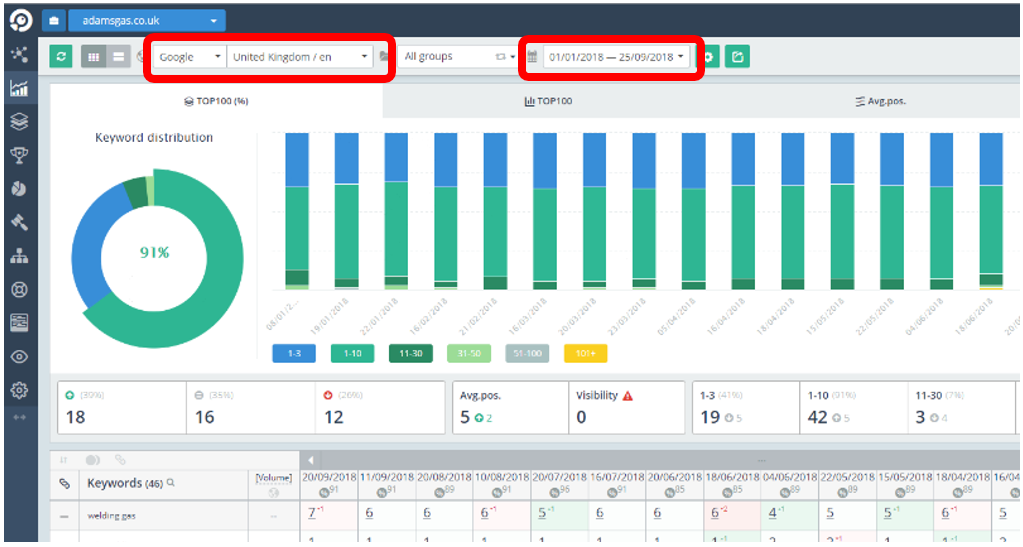
Also make sure to check Topvisor rankings over a period of 6 months so you can see if something has been slowly declining over time. You can do this by changing the date range on the top navigation bar.
If you have seen any major drops for individual keywords, this should be investigated first by seeing if there have been any changes to the relevant pages for those keywords previously, and whether this could have caused drops. You should then plan for further work on these keyphrases in the coming month.
If you have seen major drops across the board, this could indicate a number of things. The site may have a health issue that is causing problems, or there may have been an algorithm update that could be causing positions to fluctuate. You can see if this is the case by checking for news on SERoundtable, or using SERP tracking tools such as AccuRanker and SEMrush Sensor.
6.4 Google Analytics
Google Analytics is used to track, monitor and analyse site traffic. It uses a tracking code within the source code of a website to gather data and translates this into marketing information that we can use to inform both SEO and the wider digital marketing campaigns.
Google Analytics is a fundamental tool for SEO and any business wanting to make their website a point of contact with their customers. So, it’s important that you become familiar with this tool and how to gather information from it.
Please complete the following modules on Academy for Ads before continuing:
Google Analytics for Beginners (1 hour to complete)
Advanced Google Analytics (1 hour to complete)
Google Analytics Individual Qualification Exam (1 hour to complete – this is your official certification)
In terms of performing a health check, there are several things you are looking for when using Google Analytics. This includes:
- Whether Google Analytics is still tracking traffic on the website
- If this traffic has seen an improvement or a decline
- Where a client’s traffic is coming from
- If there is any spam traffic being registered that requires the implementation of a filter
Each client is logged into a particular Google Analytics (GA) account. You can check which account they are registered to by checking the ‘Tags’ on their ‘Company Profile’ in Accelo. You will already have access to all accounts via your LastPass.
6.4.1 Checking the Tracking Code Works
Firstly, to check whether Google Analytics is still tracking traffic on the website you are working on, log in to Google Analytics using the correct account and select the site you are looking for (most of our accounts manage several websites). Then go into the website on incognito mode and check the ‘Real-Time > Overview’ traffic in Google Analytics to see if your visit in incognito is being registered.
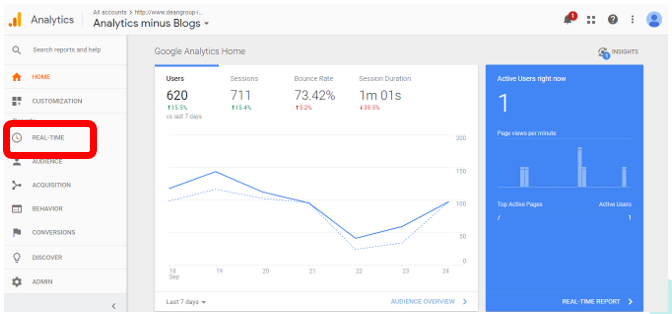
Once you are satisfied the code is still active, it’s time to look at other aspects of the health check.
6.4.2 Checking the Traffic
To see if the level of traffic has improved, on the left navigation bar, head to ‘Acquisition > All Traffic > All Channel’ and run a comparison by using the calendar field. Choose the month you want to report on, tick the ‘Compare to’ box and specify whether you would like to compare the previous year, previous period (month if you selected month) or specific dates to the data shown.
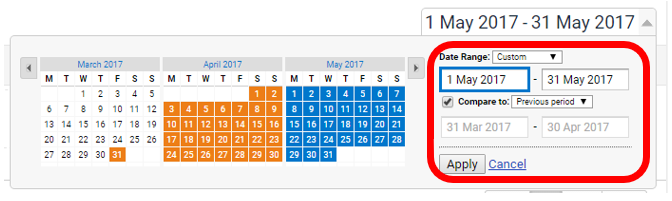
Once you hit apply, you should see something similar to what is shown below. If figures are shown in green, this figure has improved overall. If they are shown in red, they have declined.
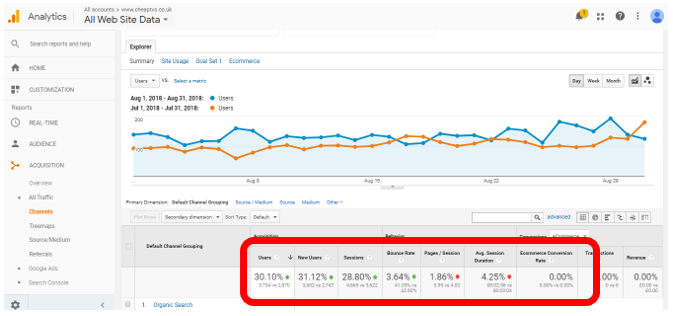
You should then look to see where traffic is coming from, particularly if traffic has gone down as shown in the image above.
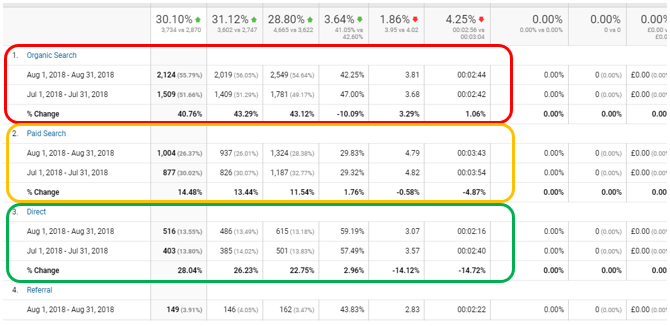
This shows you each individual channel, the amount of sessions each has generated, the Bounce Rate of these channels, and the Conversion Rate (if there are goals set up in Analytics). This can help you establish the level and the quality of the traffic coming from each channel, and whether this should be addressed in the client’s upcoming campaign.
If you are seeing high levels of Referral traffic, there may be spam traffic bots visiting the website. Although these do not harm the website, they can manipulate the data seen in Analytics, and therefore these need to be filtered out and blocked from the website if possible.
6.4.3 Checking the Landing Pages
The next step is to look at where people are landing or entering the website and whether or not the pages they are landing on need improving. You can see this by heading to ‘Behaviour > Site Content > Landing Pages’. Make sure you check the date range to ensure you are looking at, at least, the last 30 days’ worth of data, as trends in search change regularly, so you really need an overview.
*Note: if you were using the ‘Compare to’ feature previously, you might have to untick the box and hit apply again so you can see just the particular month’s results.
You will extract two main pieces of information from this screen:
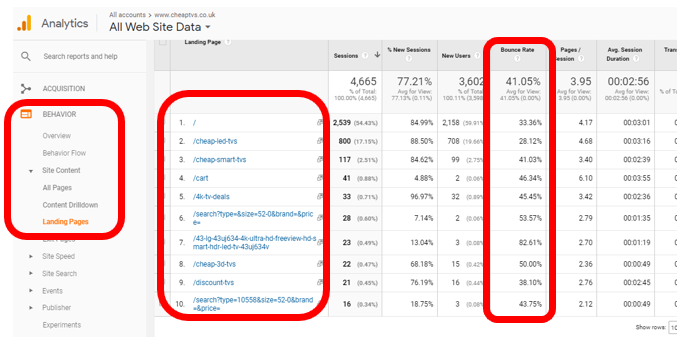
The first thing you will look at is whether traffic is coming through the product pages or the blog. While it’s good when a blog performs well, the 10 most popular pages on a website should not be dominated by blogs. If it is, it means your blogs are possibly ranking better than the product pages, or “money pages” as we call them. If this is the case, you need to check why and identify if this creates a conflict with product pages.
If there is a conflict, for example, if both blog and product page are targeting “dog grooming”, you need to speak to the account manager about possibly moving the content and the URL from the blog to the product pages and doing away with the blog post to ensure that customers are coming through the product pages.
If there isn’t a conflict, it most likely comes down to the content being more relevant to searchers queries, in which case you need to make sure the blog has strong links and call to actions that direct users back to the website and product pages themselves.
The second thing you need to look at is the ‘Bounce Rate’. If the bounce rate is high, it means that searchers are not finding what they need on your page. This could mean three things:
- Searchers are finding what they want quickly and taking action, for example, filling in a form or calling the company
- You are targeting the wrong keywords and the page is not relevant to the search
- The content on the page needs to be improved as it doesn’t answer the query fully
It’s usually very clear which one of these you are dealing with. To confirm your theory, you need to look at:
- Searchers are finding what they want quickly – check if the goal completion rate is high. If this is not set up, ask a Paid Media executive to set up goal completion for the particular form or phone number so you can gauge if the page is doing what it is supposed to do
- Wrong keyword – ask yourself if you were searching for the keyword, if you would feel the page was the right page. If you a looking for a curry recipe and you land on a page for culinary recipes, although similar, this is not what you were looking for. You might go back into your search and look for a page that gives you the answer straight away
- Page content – does the page have enough content? Does it answer a searcher’s queries, or does it just “sell” the product without much explanation? Does it have thin content? Is it relevant?
Remember to write your findings on the Health Check or Campaign Prep document and make suggestions of what would need to be done during the next month’s work.
6.4.4 Checking Conversions
If the website is an e-commerce site or has goal tracking set up, you will be able to see the conversions by heading to ‘Conversions > Overview’.
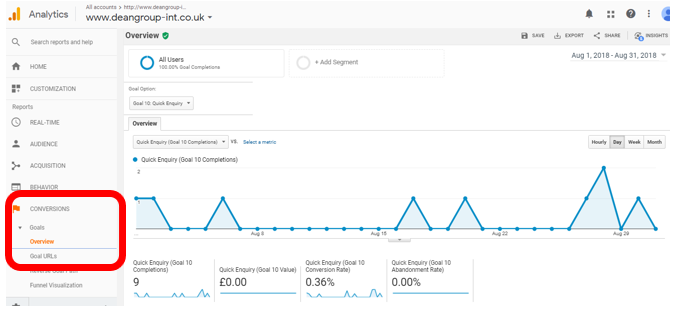
Conversions are more than just sales. They represent any time a visitor performs an action you want them to perform, for instance, filling in a form or requesting a phone call. We can track when they complete each goal and keep tabs on what goals are working well. In the case of the website above, their “Quick Enquiry or Quote” form is doing well for them and has gained them 9 conversions over the month of August. This means the form was filled in by 9 potential leads.
If the website has no goals set up, check if they have any forms or buttons that we could track and suggest it during the campaign planning meeting.
Do not forget to write your findings and your suggestions on the Health Check or Campaign Planning Prep form.
6.5 Checking Page Speed
The speed of a website is a known ranking factor, as this can heavily impact a user’s experience when visiting a website. If a website is slow to run on desktop or mobile, users may lose interest and move on to a competitor’s website. That’s why we need to check site speeds regularly as part of our health checks.
PageSpeed Insights by Google Developers is a free tool provided by Google to allow Webmasters to see how their site measures up in terms of speed for desktop and mobile devices, generating a score out of 100 to show you how well it’s performing. However, only the Desktop readings are reliable.
Visit https://developers.google.com/speed/pagespeed/insights/ to bring up the in-browser tool. Then copy and paste the URL of the site you are working on and click Analyse.
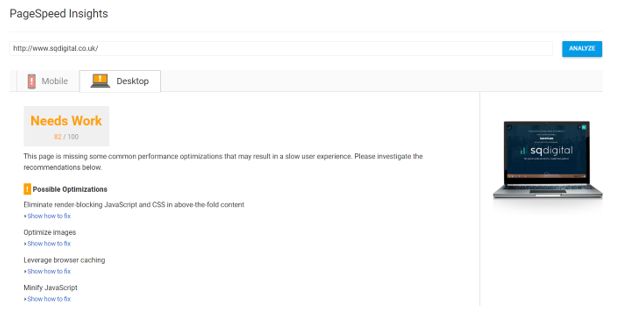
Once it has loaded, you will be shown a screen like the one above. This will detail how fast the site is performing and where it could be improved. Take note of the desktop speed only.
As the mobile-first index has become Google’s primary index recently, we also double check mobile speed by using Google’s Test My Site tool. This works in a similar way to PageSpeed Insight, but it shows you how many seconds it takes to load the mobile version of a site.
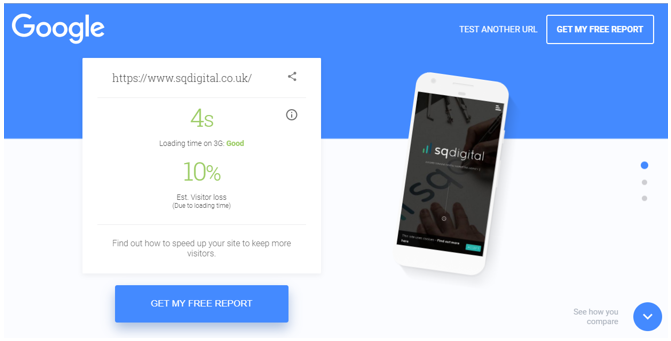
If the response time is noticeably slow, you may wish to schedule page speed fixes as part of the monthly campaign. These fixes will typically be carried out by our developers if the site was made and/or is hosted by us.
If we do not host the website and/or we did not develop it, pass your recommendations on to the client’s Account Manager and they will be able to discuss it with the client.
6.6 Checking Google My Business
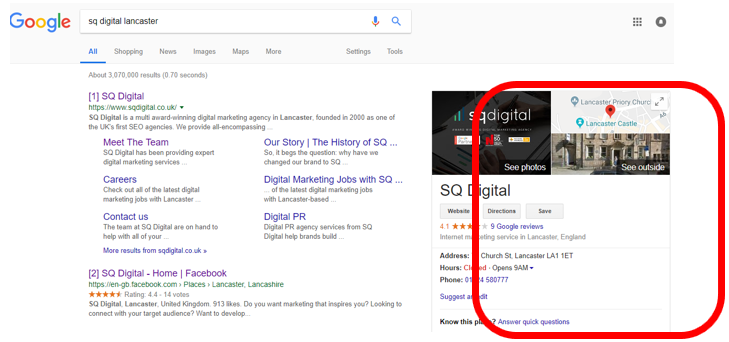
Google My Business is essentially Google Yellow Pages and it’s the platform Google uses as reference for things like “near me” searches, so it’s important that the clients’ address and contact details are kept up to date on this platform.
For more information on using and monitoring Google My Business, you can check our How to – Google My Business Monitoring guide.
Check if the profile is complete, if pictures are up to date and if there are any sales, events or other opportunities we could push through the platform.
Write in the Health Check form what needs to be done or your request for post ideas and discuss it during the campaign planning meeting.
6.7 Checking Backlinks
Another factor Google uses for ranking are backlinks to the site. Backlinks are the equivalent of word of mouth recommendations in the digital world. They basically mean a website has recognised your website as a reliable source of information and, therefore, sees you are being knowledgeable about a certain theme or subject.
Because this is a ranking factor, bad links or links obtained using Black Hat SEO techniques are seen by Google as a manipulation of the rankings and are highly frowned upon, sometimes even receiving manual penalties. So, it’s important that we keep our sites clean of such links.
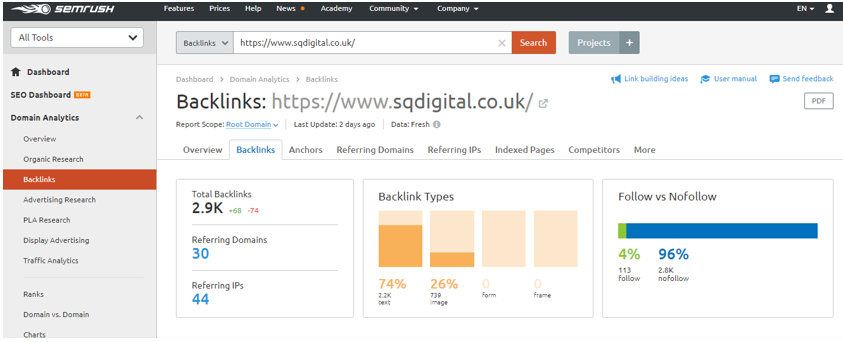
SEMrush offers a quick insight into backlinks and how they are performing. However, if we want a really in-depth look, we normally use a tool called Majestic. Going through the links and deciding which ones we should keep or clear (disavow in digital terms) takes time and therefore we normally suggest putting time aside as part of the campaign to investigate links and whether or not we need to disavow them. To do this we use SEMrush to determine how many links there are. The more links, the more time you will need.
You can find more information on how to survey links in our How to – Carry Out a Backlink Audit and Disavow guide; however, because disavowing links has such a strong effect on rankings and it’s irreversible, this is something you should only do with the supervision of a Senior SEO Executive, hence why we won’t discuss it in detail here.
Read more about the dangers of disavowing links here.
6.8 The Site Itself
Although there are a lot of tools out there that you can use in order to determine whether a website is performing as it should be, the only way you can truly understand how the website is performing from a user’s point of view is to use it yourself!
When you have completed the steps above, have a click around the website to see if everything is working as it should be. Get into the mindset of a user as you work your way through the site and see how they would go on their journey through the website.
Ask yourself the following questions as you do this:
- Has anything changed since you last worked on the website? Could this have an impact on the client’s SEO campaign or how visitors use the site?
- Is everything working normally? Are there any links, images, videos etc. that are broken?
- Is there anything on this website that needs to be improved from either an SEO point of view or to improve user experience?
This task allows for that extra element of quality control and allows you to use your own intuition to see if there is anything on a website that needs to be addressed. Remember, if you’re not sure about something – ask!
6.9 Screaming Frog
You can tell a lot about a site’s optimisation and performance by just looking at the site and using the tools already mentioned above; however, you can’t quite replicate the way Google and other search engines crawl websites and view the crucial elements of onsite optimisation.
Screaming Frog is a great tool that we use on a regular basis to simulate the ‘spider’ crawling process. At SQ Digital, we use it as a back up to SEMrush, checking things like broken URLs, duplicate content, 404 errors and missing alt tags.
If it is not already installed on your computer, you will need to install Screaming Frog by clicking the following link: https://www.screamingfrog.co.uk/seo-spider/
Screaming Frog is not only useful for performing health checks on a website but will also come in handy as you carry out various SEO tasks, such as performing 301 redirects on URLs displaying a 404 error. There are a number of useful resources that you should read and watch about Screaming Frog in order to get the best out of it, and these include:
- User Guide: https://www.screamingfrog.co.uk/seo-spider/user-guide/
- How to Bulk Check Redirects: https://www.screamingfrog.co.uk/redirect-checker/
- Screaming Frog Guide to Doing Almost Anything: http://www.seerinteractive.com/blog/screaming-frog-guide/
- Screaming Frog YouTube Channel: https://www.youtube.com/user/screamingfroguk/videos
- Screaming Frog 6.0 Intro Video: https://www.youtube.com/watch?v=RKyuQa5wZl0
Once you have read the literature surrounding Screaming Frog, you should have a basic idea of how to use it. In reference to a health check, you are looking for elements such as:
- URLs with long title tags, meta descriptions etc. – http://www.seerinteractive.com/blog/screaming-frog-guide/#How_to_identify_pages_with_lengthy_page_titles_meta_descriptions_or_URLs
- URLs with thin content – http://www.seerinteractive.com/blog/screaming-frog-guide/#How_to_identify_pages_with_thin_content
- URLs with duplicate content – http://www.seerinteractive.com/blog/screaming-frog-guide/#How_to_find_URLs_that_need_to_be_rewritten_redirected_canonicalized
After you’ve read through the information, we recommend having a play around in Screaming Frog and trying out some of the tutorials for yourself.
6.10 Summary
There is one distinct reason why a SEO health check is performed at the very beginning of a campaign month; it is necessary to inform what you will be addressing in your SEO planning.
Your key take-aways from your SEO health check should include:
- Keywords that have dropped significantly in position and need to be addressed through SEO improvements, SEO content edits and/or research and development (R&D).
- Keywords that are stagnant in position and not ranking on page 1, which would benefit from SEO improvements or through improving SEO content.
- Health issues such as 404 errors and manual actions that need to be addressed in the campaign month in order of priority
- Slow desktop page speed that could be affecting user experience and SEO campaign progress
- Any other visible issues on the website that you feel need to be addressed as part of your plan.
Helpful Links
- 5 Most Common On-Page SEO Issues and How to Fix Them (Infographic) – https://raventools.com/blog/most-common-seo-issues/
- Top 10 Technical SEO Issues and How To Fix Them – http://www.cio.com/article/2376266/internet/top-10-technical-seo-issues–and-how-to-fix-them-.html
- Why Have My Rankings Dropped? An SEO Troubleshooting Guide – https://www.koozai.com/blog/search-marketing/why-have-rankings-dropped/
- Common Website Errors and How to Fix Them – https://localseochecklist.org/blog/common-website-errors-and-how-to-fix-them/
Complete Task 5: Health Check
7. Planning a Campaign
Following the completion of an SEO Health Check, you should be in position to plan client’s monthly campaign. SEO also plays a big part in guiding other digital disciplines and teams as to what they need to accomplish for the client.
Before putting a plan into place:
- What package type is the client on?
- What is their allocated SEO time/tasks?
- Do they require a certain amount of time to be allocated to creative tasks, for example do they require one blog per week?
7.1 Understanding What to Plan for SEO
The first thing you should look at is the keyword positions. Have any important keywords dropped? These will require immediate attention.
This is also applicable if keyword positions appear to be stalling or are not naturally progressing through the rankings. This task includes checking and improving the following:
- The meta and HTML tags: title tags, header tags, URLs, meta descriptions etc.
- Content optimisation or extension
- Internal linking
- ALT tags for images
If you uncovered any URL errors during your checks of the Google Search Console, you should suggest planning in 301 redirects and URL fixes to address these as part of the campaign. This includes addressing sitemap errors, which can often be rectified by resubmitting the sitemap. This also applies to any issues identified as part of a Screaming Frog crawl.
If you have identified slow page speed as part of your health check, you should consider suggesting Page Speed Improvements as part of the campaign. These will typically be carried out by our developers.
7.1.1 Everything Seems Fine, What Should I Do?
When you’ve been working on a campaign for a while, you should hopefully be achieving great results and therefore will start to see consistent progress.
While it is often best to leave a high performing page well alone, you can certainly improve other aspects of the site to benefit the user.
Tasks such as Blog Optimisation are helpful in terms of getting the most out of blog posts on the site through carrying out Keyword Research and optimising the content, title tags and meta descriptions.
User Experience (UX) Audits, Competitor Analysis and Trend Research are typically used to improve a website in this manner as well and will often look at suggesting things that will guide future campaigns.
Once you are sure that the optimisation of the site you are working on is in top condition and your target keywords are all ranking on the first page of Google, it’s the perfect time to begin looking into off-site SEO.
To learn more about this, watch this video: https://www.webpagefx.com/blog/internet/seo-basics-site-needs-links/
One of the ways we can add links to a site is to look at directories we could add the customer to. It’s important that these directories are of high quality, so research directories based on industry and product.
Another way to add links to a site is to use Digital PR to outreach e.g. a blog post to other publications and outlets. This is done by the content team. If you feel the client would benefit from more links than the directories you have already added them to, mention the need for some outreach on your Health Check form and discuss it in the campaign planning meeting.
7.1.2 Prioritising Tasks
Because you are working within the constraints of a monthly budget, it is important to prioritise tasks to establish what absolutely needs to be done in that month, and what could potentially wait to be completed in the months that follow.
With limited experience, it can be hard to understand what needs to be done and what can wait, so always ask another member of the SEO team if you are unsure.
Watch the Moz Whiteboard Friday on how to prioritise SEO tasks and ensure that you are investing your time in tasks that offer value to the campaign and the client: https://moz.com/blog/prioritize-seo-tasks-invest-high-value-work-items
Once you have watched this, read this blog, as it shows an excellent way for you to order your tasks and decide what you need to do in the month ahead.
7.2 Understanding How to Help Other Teams
SEO also guides what other digital disciples do for a month.
7.2.1 Working with PPC
SEO can recommend words PPC could use for their marketing. Equally, we can also use PPC terms that are converting well to try and make them work organically. Afterall, the less a client pays for a conversion, the more profit they make.
7.2.2 Working with Content
By suggesting keywords, SEO also directs what the content team should write about. At the very least, you will need to suggest keywords and target pages for the team to internally link the blogs to for the visitor to continue their journey through the website and for the search engine spiders to add weight to a page.
For example, if we decide to push “SEO Agency” as a term for SQ Digital, the content team would then be requested to come up with ideas for content that links to this keyword and can be linked back to the product page that focuses on it.
SEMrush also offers a tool that suggests content ideas based on keywords, so it could be worth having a look and suggesting these ideas to the content team if they suit the customer’s goals.
In SEMrush, head to ‘Keyword Analytics > Keyword Magic Tool’, enter the term you want to research and make sure you are focusing on the UK (if the customer is focusing on the British Market, which most of our customers are).
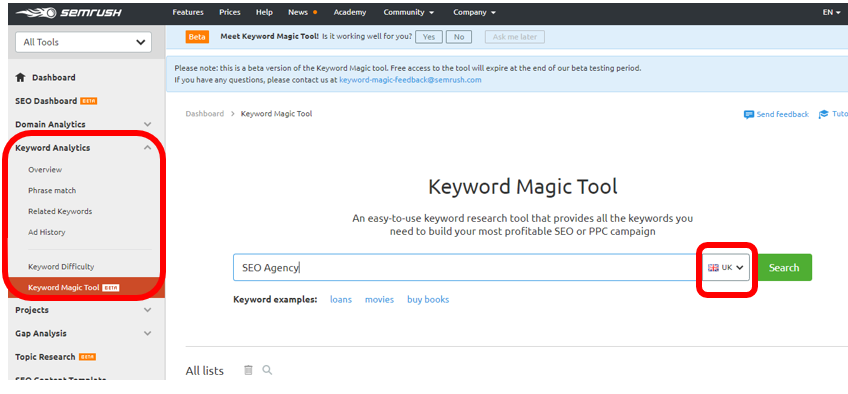
Once the platform loads the suggestions for the keywords you are focusing on, select ‘Questions’ and note down relevant questions with good search volume that could be passed on to the Content Team.
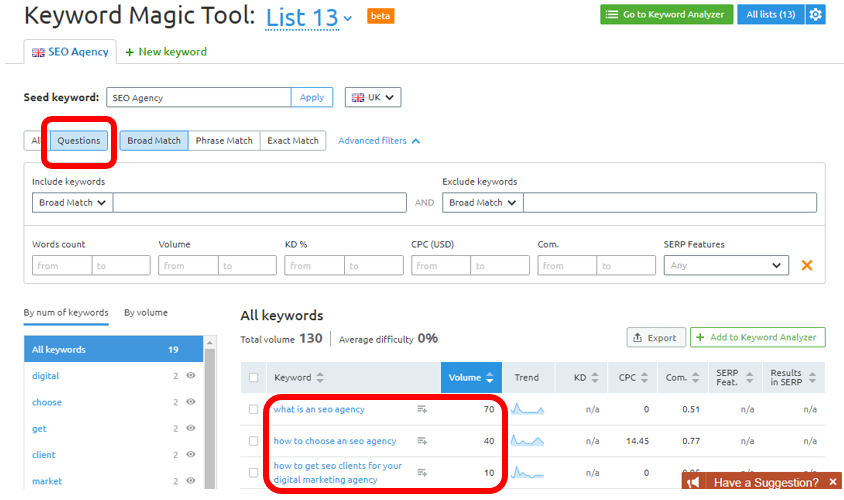
Also, when the content team has a great idea but need our guidance on what keyword to focus on for internal linking and which URL to link it to. When doing Health Checks and looking at landing pages, we can also inform the content team of blog posts that are doing particularly well. This might help them choose similar ideas for future content.
7.2.3 Working with Social Media
When SEO has requested a subject as a focus, social media will include this theme into their schedule for the month that follows. The trends that we spot while doing our research can also be used to give the Social Team a heads up on what themes or subjects will become popular soon. This can guide what they cover and talk about on the client’s social media platforms.
7.2.4 SQ Processes & Campaign Planning
Please make sure you read the company wide guidelines for campaign planning by reading the following How to Guides:
How to – Hold a Campaign Planning Meeting (Platinum Customers)
Complete Task 6: Campaign Planning
Next Steps
You should be now be familiar with the basics of SEO. You will still need to keep up-to-date with the latest changes occurring in the industry, as well as understanding more advanced approaches to SEO.
As well as all the learning you will do while working on live clients, you should constantly keep up-to-date with the following industry blogs and news websites:
- Google Webmaster Blog – https://webmasters.googleblog.com/
- Moz Blog – https://moz.com/blog
- Search Engine Roundtable – https://www.seroundtable.com/
- Yoast SEO Blog – https://yoast.com/seo-blog/
- Search Engine Land – https://searchengineland.com/
You will now be able to perform health checks and will also be able to look at more complex and technical SEO tasks moving forward. These elements are better learned in practical sessions, with the assistance of an experienced SEO Executive and using the relevant software.
Additional How to Guides:
Blog Optimisation and Blog Management
Conducting Competitor Analysis
Task 1: On-Page Optimisation
Now that you understand what is important for white hat SEO, what onsite and offsite SEO is, and what keywords are, you should have a good idea of what to look for on a website to assess whether it is optimised properly.
So, let’s put your new-found knowledge to the test!
- Going back to page 8 of this guide and looking at the perfectly optimised page, what keyword is Mary’s Bakery targeting for this page? Where would you expect to see this keyword to appear?
- Visit https://www.missguided.co.uk/dresses/green-dresses and https://www.heritagebuildersltd.co.uk/services/
- What keywords are these two pages focusing on?
- What has each website got right in their on-site optimisation for their respective keywords?
- What has each website got wrong in their on-site optimisation for these keywords?
- What 5 things, if anything, should each website do to improve their on-site SEO performance?
Time to complete: 1 hour 30 mins
Please check over your work and notify your trainer once you have finished this task.
Task 2: Keyword Research
First, watch this video by Moz to understand more about the keyword research: https://moz.com/learn/seo/what-is-keyword-research?wvideo=7johwocpmz
Now we’d like you to try some keyword research of your own.
- Visit https://www.comparecover.com/ and do some keyword research that can be used as part of the client’s SEO campaign.
Ask your trainer to show you where to find the template for the excel spreadsheet we use for keyword planning. Focus on the homepage and their top navigation pages – Travel Insurance, Life Insurance, Pet Insurance and About Us – and write down a selection of 1 primary keyword and 3 secondary keywords we should target for these pages as well as their search volume (columns A, B and C of the template).
- As part of our keyword research we also take stock of how the customer’s website is currently performing for the terms we are suggesting. Using Fat Rank’s Chrome Extension, check each term and note down on column D & E where the customer’s website is ranking and what page is ranking for that keyword term. Ask your trainer to show you how this works if you are unsure.
Time allocated: 1.5 hours
Once you have finished, check over what you have done and then let your trainer know.
Task 3: Keyword Plan
Use the signed off keyword research that you completed as part of the previous task to create a keyword plan for https://www.comparecover.com/.
Use the keyword plan template you have used for the keyword research you have done.
You should include each of the SEO elements described in this chapter to demonstrate your understanding of how each of these will fit into the keyword plan.
Please note: even though your page could be targeting 3 keywords, it will only have 1x Title tag, 1x H1 and 1x Meta Description. So, you do not need to write these for each keyword, but you need to write one version of them that contains all the relevant information.
Allocated time: 1 hour
Once you have finished, check over your work and then let your trainer know.
Task 4: SEO Content
Now that you know a bit more about writing SEO friendly content, it’s time for you to give it a try. We’d like you to write a page of content for the SQ Digital website promoting ‘SEO Content Writing in Lancaster’.
Feel free to use the SQ Digital website to source any information you need about our other services and technical information that you can use.
Allocated Time: 1 hour
Once you’ve finished, look over what you have written and then notify your trainer.
Task 5: Health Check
Ask your trainer to show you what Health Check form you should use and conduct a health check of the SQ Digital website. Ensure you document every single step you take throughout this process (you’ll need this later).
If you have any questions about this, please ask your trainer.
Time allocated: 1 hour
Once you’ve finished, look over what you have done and then let your trainer know.
Task 6: Campaign Planning
Now that you have an idea of what goes into planning an SEO campaign and prioritising SEO tasks, it’s time for you to try it for yourself.
Using the health check you completed in the previous task, plan a month-long SEO campaign for SQ Digital. This is not limited by budget or hours but please allocate a realistic amount of work that could be completed in a month.
You should note each task that you suggest, as well as details about why this is factored in this plan and how you feel it would benefit the campaign.
Time Allocated: 1 hour
Once you have finished, check over your work and then let your trainer know.