SEO – How To – Trend Research
Purpose of this How To Guide: To show when and how to create slideshows for social media using Adobe Spark.
Applicable to: SEO Executives
Customers: All
Timescale: 1 – 2 hrs, the more time we have the more terms we can research
Introduction
Trend Research helps to create an editorial calendar for customers, so that we can act on trends ahead of time in order to maximise content and social exposure. It’s also particularly helpful to guide clients on what products to push or highlight at particular times of the year.
Google Trends is a free tool that allows you to visualise and analyse search trends by region and date. There are several uses for this tool, from real-time trends to historic trends up to five years old, but for the purpose of this guide we will focus on historic trends trying to forecast trends in the current year.
Please note: Trend Research will not be applicable to every client and some of them might not have a defined trend, but it’s always worth exploring, as trends are influenced by an array of factors, from the weather to public holidays, and sometimes companies and products you think would not have a defined trend, do.
How to Perform a Trend Research
Use Keywords
Every client of SQ Digital has a keyword plan. The first port of call for trend research is to try and see if there are any trends within the client’s main keywords, so we can access which keywords to push in particular times of the year.
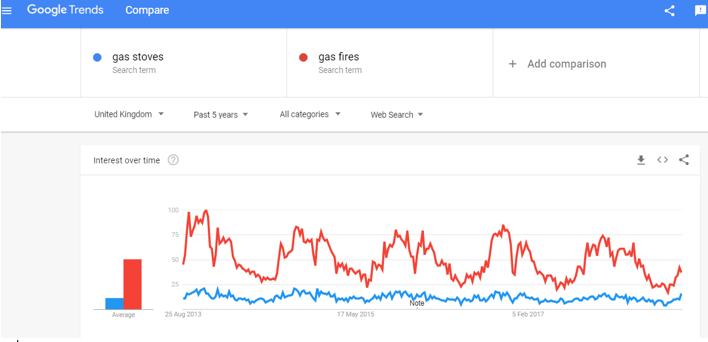
Take for example Real Flame, a fireplace retailer. Their main keywords include: ‘Gas Fires London’ and ‘Gas Stoves London’. When running these keywords through Google Trends for the UK and looking at the last 5 years of data, it becomes apparent that ‘gas fires’ are more popular than ‘gas stoves’ and that these products follow a very predictable yearly pattern, trending from early August one year to early March the next, every year.
Check Relevant Special Occasion Dates
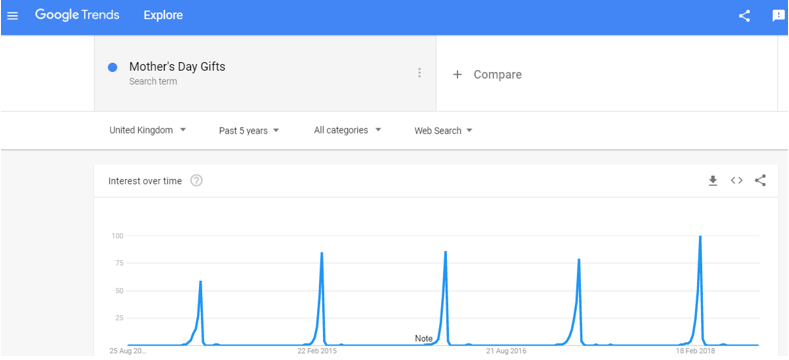
Trend research can also tell you when to start pushing for a special occasion. This could be particularly interesting for retailers who use special dates such as Valentine’s Day and Christmas for pushing sales. The trend reading below for Mother’s Day shows that this particular date starts trending at the end of January and it peaks in early March.
Check Popular Events, Seasons and Audiences
If the client sells on a B2C capacity, it’s also worth using variations of words that are relevant to the client’s business and digital marketing campaign. Make sure to check the following:
- Seasons:
- E.g. Travel Industry: summer holidays, winter break, autumn break
- E.g. Fashion Industry: fall collection, summer collection, summer sale
- Check Target Audience:
- E.g. Travel: romantic holidays (couples), family holidays (families with young children), adult holidays (older couples), gap year travel (students)
- E.g. Food & Drink: meals for two, family meals, family deals,
- Check the Effect of Popular Events:
- E.g. London Fashion Week (would mean accommodation in a part of London would be in demand up to a month before the event), back to school (means uniforms, school material and child care would come into focus)
Tips:
- As all our customers are currently UK-centric, make sure all your trend research is done with the UK as your focus region, but selecting the UK in any page you visit.
- Always look at the ‘Last 5 Years’ of data, this makes it easier to spot regular patterns.
- Google Trends search facility works best with 2-word combinations, such as “summer holidays”, rather than longtail keywords. It’s also particularly good to compare similar keywords such as “summer holidays” and “summer break”.
How to Apply Trend Research to Campaign Plans
In order for pages to rank organically, content should be published at least a month before a trend hits so that, by the time it does, your content has already been picked up by the search engines and its optimisation is already working and making the page / blog post rank.
Social media, on the other hand, has to stay current and talk about what people are currently talking about, otherwise it might get automatically dismissed as irrelevant.
Once you have compiled your editorial calendar for the next few months, look ahead at least 3 months and consider the following:
- Capitalise on Opportunities – If something is in demand, it’s usually good practice to keep it at full price and advertise for it. If it’s not in demand, it’s a good time to discuss a sale with the customer to generate interest and sell the product out of season.
- Content Ideas and Campaign Themes – If you know “outdoor fires” starts trending in April, start getting ready for it in March/end February and start looking at ideas to suit “outdoor fires” as a theme, for instance, ‘landscaping’, ‘outdoor garden’, ‘garden design’ > ‘best outdoor fires for your garden’
- Social Media Ideas & Email Marketing Campaigns – Talk about trends when they are on their way to peaking or at the top of their peak. This will make the client look current and relevant as well as encourage engagement.
- PPC Push – PPC will bring traffic to the website regardless and it will usually work year-round. However, if you know something is about to trend or trending, it might be worth increasing the budget on its advertising to make sure it capitalises on the high search volume.
How to Present the Trend Research to a Client
Using the Trend Research Report Form, fill in the information you think is worth sending to the client.
- Take a screenshot of the graph in Google Trends
- Highlight the time of the year when the trend is relevant (time window)
- Highlight when it peaks (Peak)
- And the application – push for PPC, content focus, social media posts, sale opportunities.
After Trend Research
- Have it proofread and passed through QC before sending it to the account manager and lead for future reference.
- The account manager might then decide to send this on to the client.
- Add the trend report to the client’s asset folder in One Drive and to the trend research task in Accelo.
- Keep this document in mind when performing Health Checks for the client. When preparing for Campaign Planning Meetings (for Platinum Customers), write in the “Trends” section of the Health Check Form any upcoming trends looking ahead at least 3 months. For Silvers add your notes to the SEO section of the SILVER Campaign Prep and Plan Form (you can find this document in the individual Customer’s Digital Assets folder on OneDrive, in the Work Plans folder).
- Complete your Trend Research task in Accelo.